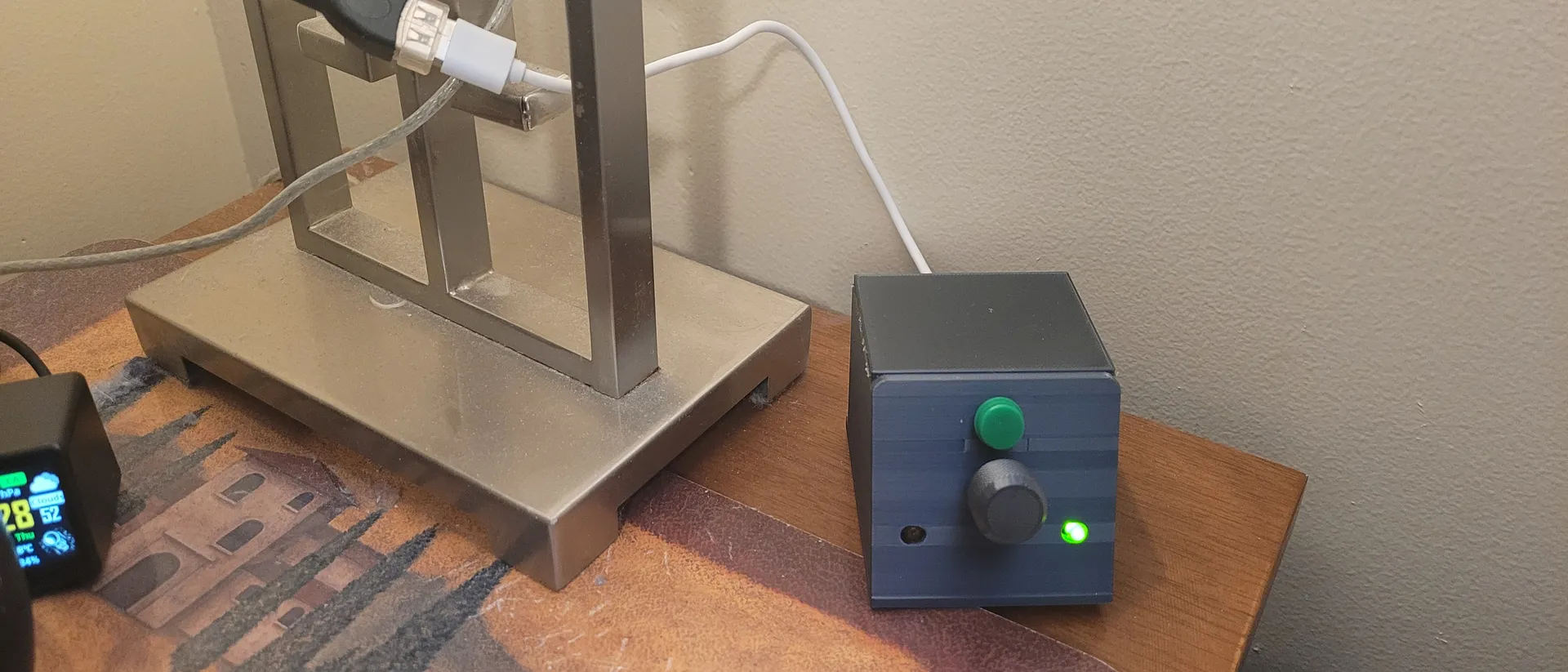
The Goal: Analog Feel, Smart Control
The concept is simple but highly functional. The box features a rotary encoder (the dial) to turn the lights on/off and dim them with a satisfying, analog feel. A momentary switch acts as a selector button to toggle which light you are controlling, indicated by green and yellow LEDs.
While it sounds straightforward, achieving a consistent user experience required some under-the-hood complexity. The device integrates with Home Assistant using homeassistant platforms and lambda calls to track the live state of the lamps. Knowing the state of the lamp at the exact moment of control is crucial for a smooth user experience.
How It Works (The Logic)
To keep the bedside experience seamless, the ESPHome YAML handles a few clever UX tricks:
- Dual-Zone Control: Toggle between Light 1 (Guest Room Lamp) and Light 2 (3D Printer Lamp) with the selector button.
- The Dial: Press the encoder to toggle the active light on/off; rotate it to dim or brighten from 0% to 100%.
- Boot Drama: On boot, the LEDs blink back and forth three times just to add a little cinematic flair.
- Smart Sleep Timer: Indicator LEDs turn off after 60 seconds of inactivity so they don’t light up the bedroom. Any physical input wakes them back up.
- The 3 AM Rule: If a light’s brightness is changed via the Home Assistant app or an automation, the box’s LEDs stay dark. Your phone tweaks won’t turn the controller into an accidental nightlight.
The Hardware and the AI Sidekick
For the enclosure, I 3D-printed a basic housing. It works perfectly, though it’s a bit lightweight. In a future iteration, I’d add some weight to the base so it doesn’t slide around when turning the dial.
The real twist in this project was the code. I used up the last of my ancient ESP8266 chips for this. My initial YAML code was, frankly, flawed. This was my first time using Claude Code, and it was a fantastic learning experience. It helped me clean up my logic and bridge the gap between the physical hardware and Home Assistant’s state engine.
Limitations and Practicality
This controller isn’t standalone; it relies entirely on Home Assistant. The lights must already exist in your setup as dimmable entities—whether they are Zigbee, Z-Wave, or a custom controlled LED strip.
Final Thoughts: “Good Enough” is Great Design
Maybe it’s an age thing, but manually turning a dial just feels better than tapping a glass screen.
What cracks me up is that I interact with this little box almost daily. It solves a basic, boring problem so conveniently that it has become my favorite smart home addition. I could iterate a dozen times to find the “perfect” design, but sometimes, “good enough” is exactly what makes a project perfect
Roadmap
From my learnings with the MVDialer project, this kind of device will be usefull build with a battery and ESP32 level controller (where sleep and deep sleep) can be used. Making it mobile rather than a USB powered device just makes sense and means my partner can just grab it and put it on her side. Hmmm… maybe I should build one for each of us!
################################################################################
# BEDSIDE CONTROLLER
#
# Hardware: Wemos D1 Mini (ESP8266)
# Purpose:  Controls two Home Assistant lights from a single rotary encoder + 2 buttons
#
# HOW IT WORKS:
#   - One "active light" is selected at a time (Light1 or Light2)
#   - GreenLED  lit = Light1 (guest room lamp) is active
#   - YellowLED lit = Light2 (3D printer lamp) is active
#   - SELECTOR button  : toggles which light is active, LEDs update to show selection
#   - ENCODER press    : toggles the active light ON / OFF
#   - ENCODER rotate   : dims or brightens the active light (0-100%)
#   - On boot          : LEDs blink back and forth 3 times, then settle on active light
#   - Sleep timer      : after 60s of no user input, indicator LEDs go dark (night-friendly).
#                        Any user input (selector / encoder press / rotary turn) re-lights
#                        the active LED and restarts the 60s timer. HA-pushed brightness
#                        changes do NOT wake the LEDs (so a phone tweak at 3am stays dark).
#
# WIRING:
#   GPIO04 — Selector momentary button (INPUT_PULLUP, active LOW)
#   GPIO05 — Encoder push button      (INPUT_PULLUP, active LOW)
#   GPIO12 — Encoder CLK (pin A)
#   GPIO14 — Encoder DT  (pin B)
#   GPIO13 — Green  LED output (Light1 indicator)
#   GPIO15 — Yellow LED output (Light2 indicator) — D8 on Wemos D1 Mini
#   GPIO02 — Built-in status LED (active LOW — inverted: true)
#
# NOTE: Both target lights must be dimmable. Non-dimmable entities will fail.
# NOTE: Target lights are set in substitutions below.
################################################################################


################################################################################
# SUBSTITUTIONS — Change values here to reconfigure without editing the logic
################################################################################
substitutions:
  device_internal_name: esphome_bedsider_config
  device_wifi_name: esphome-bedsider-config-wifi
  device_friendly_name: ESPHome bedsider_config
  device_ip_address: 192.168.X.X
  device_sampling_time: 30s
  Active_Light1: light.guestroomlamp                        # Green  LED = this light
  Active_Light2: light.esphome_web_be7938_3dprinter_lamp    # Yellow LED = this light


################################################################################
# GLOBALS
# active_light: 0 = Light1 (green), 1 = Light2 (yellow)
# Not restored on reboot — always starts on Light1
################################################################################
globals:
  - id: active_light
    type: int
    initial_value: '0'


################################################################################
# BOARD
################################################################################
esphome:
  name: ${device_internal_name}
  friendly_name: ${device_friendly_name}
  on_boot:
    priority: -100   # Run last — after WiFi, API, and globals are all ready
    then:
      # Visual boot sequence: blink LEDs back and forth 3 times
      - repeat:
          count: 3
          then:
            - light.turn_on:
                id: GrnLed
            - light.turn_off:
                id: YlwLed
            - delay: 300ms
            - light.turn_off:
                id: GrnLed
            - light.turn_on:
                id: YlwLed
            - delay: 300ms
      # Settle LEDs to reflect the initial active_light value (0 = GrnLed),
      # then start the 60s sleep timer so the room goes dark if nobody touches it.
      - script.execute: wake_leds

esp8266:
  board: d1_mini


################################################################################
# LOGGING — WARN only; change to DEBUG temporarily when troubleshooting
################################################################################
logger:
  level: WARN
  logs:
    homeassistant.sensor: ERROR   # Suppress "Can't convert 'None'" when lights are off


################################################################################
# HOME ASSISTANT API
################################################################################
api:
  reboot_timeout: 0s   # Don't reboot if HA goes offline — just wait patiently
  encryption:
    key: !secret api_encryption_key


################################################################################
# OTA + SAFE MODE
################################################################################
ota:
  - platform: esphome
    password: !secret web_server_password

# Safe mode: if device crashes 5 times in a row, boot into recovery state
safe_mode:
  reboot_timeout: 10min
  num_attempts: 5


################################################################################
# WIFI
################################################################################
wifi:
  networks:
    - ssid: !secret wifi_ssid
      password: !secret wifi_password
  min_auth_mode: WPA2
  manual_ip:
    static_ip: ${device_ip_address}
    gateway: !secret gateway_address
    subnet: !secret subnet_address
  power_save_mode: NONE   # More stable and faster to reconnect on ESP8266
  fast_connect: true       # Connect directly without scanning — faster boot
  # Fallback hotspot: if WiFi fails, device creates its own network for recovery
  ap:
    ssid: ${device_wifi_name}
    password: !secret web_server_password

# Captive portal shown when connected to the fallback hotspot
captive_portal:


################################################################################
# WEB SERVER — Local dashboard for diagnostics (D1 Mini has enough RAM)
################################################################################
web_server:
  port: 80
  version: 2
  include_internal: true
  auth:
    username: !secret web_server_username
    password: !secret web_server_password
  local: true


################################################################################
# STATUS LED — Built-in LED blinks to show WiFi/API connection state
# GPIO2 is active-low on ESP8266, so inverted: true corrects the logic
################################################################################
status_led:
  pin:
    number: GPIO2
    inverted: true


################################################################################
# TIME — Sourced from Home Assistant (used for any time-based logic)
################################################################################
time:
  - platform: homeassistant


################################################################################
# SCRIPTS
#   update_leds : sets the indicator LEDs to match active_light (immediate)
#   wake_leds   : called on every user input — lights the active LED and (re)starts
#                 the 60s sleep timer
#   sleep_leds  : restart-mode timer — after 60s of no wake_leds calls, both LEDs
#                 go dark for night-friendly operation. Each wake_leds call cancels
#                 the in-progress delay and starts a fresh 60s countdown.
################################################################################
script:
  - id: update_leds
    then:
      - if:
          condition:
            lambda: 'return (id(active_light) == 0);'
          then:
            - light.turn_on:
                id: GrnLed    # Light1 active — green on
            - light.turn_off:
                id: YlwLed
          else:
            - light.turn_on:
                id: YlwLed    # Light2 active — yellow on
            - light.turn_off:
                id: GrnLed

  - id: wake_leds
    mode: restart
    then:
      - script.execute: update_leds
      - script.execute: sleep_leds   # (re)start the 60s sleep countdown

  - id: sleep_leds
    mode: restart   # Each call cancels in-progress delay and starts fresh
    then:
      - delay: 60s
      - light.turn_off:
          id: GrnLed
      - light.turn_off:
          id: YlwLed


################################################################################
# BINARY SENSORS
################################################################################
binary_sensor:

  # Connection status — reports online/offline to Home Assistant
  - platform: status
    name: "Status"
    id: ${device_internal_name}_status

  # ENCODER BUTTON — press to toggle the active light ON or OFF
  - platform: gpio
    pin:
      number: GPIO05
      inverted: true
      mode:
        input: true
        pullup: true
    id: button
    filters:
      - delayed_off: 50ms   # Debounce — physical switches can "bounce" within a few ms
    on_click:
      then:
        - if:
            condition:
              lambda: 'return (id(active_light) == 0);'
            then:
              - homeassistant.service:
                  service: light.toggle
                  data:
                    entity_id: ${Active_Light1}
            else:
              - homeassistant.service:
                  service: light.toggle
                  data:
                    entity_id: ${Active_Light2}
        # User pressed the encoder — wake the indicator LEDs and restart sleep timer
        - script.execute: wake_leds

  # SELECTOR BUTTON — press to switch between Light1 and Light2
  - platform: gpio
    pin:
      number: GPIO04
      inverted: true
      mode:
        input: true
        pullup: true
    id: selector
    filters:
      - delayed_off: 50ms   # Debounce — 50ms prevents a single press registering twice
    on_press:
      then:
        # Toggle active_light between 0 (Light1) and 1 (Light2)
        - lambda: |-
            id(active_light) = (id(active_light) == 0) ? 1 : 0;
            ESP_LOGD("selector", "Active light is now %d", id(active_light));
        # Update the indicator LEDs to show the new selection AND restart sleep timer
        - script.execute: wake_leds


################################################################################
# SENSORS
################################################################################
sensor:

  # WiFi signal strength — reported to HA for monitoring connection quality
  - platform: wifi_signal
    name: "WiFi Signal Sensor"
    id: ${device_internal_name}_wifi_signal_sensor
    update_interval: ${device_sampling_time}

  # Uptime in raw seconds — internal only, human-readable version sent to HA below
  - platform: uptime
    name: "Uptime Sensor"
    id: ${device_internal_name}_uptime_sensor
    update_interval: ${device_sampling_time}
    internal: true
    on_raw_value:
      then:
        - text_sensor.template.publish:
            id: ${device_internal_name}_uptime_human
            state: !lambda |-
              int seconds = round(id(${device_internal_name}_uptime_sensor).raw_state);
              int days    = seconds / (24 * 3600);
              seconds     = seconds % (24 * 3600);
              int hours   = seconds / 3600;
              seconds     = seconds % 3600;
              int minutes = seconds / 60;
              seconds     = seconds % 60;
              return (
                (days    ? to_string(days)    + "d " : "") +
                (hours   ? to_string(hours)   + "h " : "") +
                (minutes ? to_string(minutes) + "m " : "") +
                (to_string(seconds) + "s")
              ).c_str();

  # ROTARY ENCODER — turning adjusts brightness of the active light (0–100%)
  # resolution: 4 = 4 electrical pulses per physical detent (common for KY-040 encoders)
  # The filter fires on_value at most once per 100ms OR when the value jumps by 10+
  - platform: rotary_encoder
    id: myrotary_encoder
    name: "Rotary Encoder"
    min_value: 0
    max_value: 100
    resolution: 4
    filters:
      - or:
        - debounce: 0.1s   # Minimum 100ms between updates when dialing slowly
        - delta: 10        # OR fire immediately if value jumps by 10 or more
    pin_a:
      number: GPIO12   # CLK on encoder module
      inverted: true
      mode:
        input: true
        pullup: true
    pin_b:
      number: GPIO14   # DT on encoder module
      inverted: true
      mode:
        input: true
        pullup: true
    on_value:
      then:
        # Send new brightness to HA only if the encoder has actually moved away
        # from the light's current brightness — avoids redundant HA service calls.
        # wake_leds is called INSIDE each then: block so HA-pushed brightness syncs
        # (which call set_value on the encoder and trigger on_value but pass the guard
        # because encoder == HA value) don't wake the LEDs at night.
        - if:
            condition:
              lambda: 'return (id(active_light) == 0 && (int)((id(bright1).state / 2.55) + 0.5) != x);'
            then:
              - homeassistant.service:
                  service: light.turn_on
                  data:
                    entity_id: ${Active_Light1}
                    brightness_pct: !lambda 'return x;'
              - script.execute: wake_leds
        - if:
            condition:
              lambda: 'return (id(active_light) == 1 && (int)((id(bright2).state / 2.55) + 0.5) != x);'
            then:
              - homeassistant.service:
                  service: light.turn_on
                  data:
                    entity_id: ${Active_Light2}
                    brightness_pct: !lambda 'return x;'
              - script.execute: wake_leds

  # BRIGHTNESS SYNC — HA pushes the active light's brightness back to us.
  # We use this to keep the encoder position in sync with the actual light level,
  # so that the first turn of the dial doesn't jump from a stale position.
  #
  # IMPORTANT: we only update the encoder when THIS light is the active one.
  # Without the active_light guard, changes to the inactive light (e.g. from a
  # phone or schedule) would silently snap the encoder to the wrong position.

  - platform: homeassistant
    id: bright1
    entity_id: ${Active_Light1}
    attribute: brightness   # HA brightness is 0–255; we convert to 0–100 for the encoder
    on_value:
      then:
        - if:
            condition:
              # Guard: only sync if Light1 is active AND brightness is valid AND encoder differs
              lambda: 'return (id(active_light) == 0 && x >= 0 && x <= 255 && (int)((x / 2.55) + 0.5) != (int)id(myrotary_encoder).state);'
            then:
              - sensor.rotary_encoder.set_value:
                  id: myrotary_encoder
                  value: !lambda 'return (int)((x / 2.55) + 0.5);'
              - logger.log: "Encoder synced to Light1 brightness"

  - platform: homeassistant
    id: bright2
    entity_id: ${Active_Light2}
    attribute: brightness
    on_value:
      then:
        - if:
            condition:
              # Guard: only sync if Light2 is active AND brightness is valid AND encoder differs
              lambda: 'return (id(active_light) == 1 && x >= 0 && x <= 255 && (int)((x / 2.55) + 0.5) != (int)id(myrotary_encoder).state);'
            then:
              - sensor.rotary_encoder.set_value:
                  id: myrotary_encoder
                  value: !lambda 'return (int)((x / 2.55) + 0.5);'
              - logger.log: "Encoder synced to Light2 brightness"


################################################################################
# TEXT SENSORS
################################################################################
text_sensor:

  - platform: wifi_info
    ip_address:
      name: IP Address
      id: ${device_internal_name}_ip_address
    ssid:
      name: Connected SSID
      id: ${device_internal_name}_connected_ssid
    mac_address:
      name: Mac Wifi Address
      id: ${device_internal_name}_mac_address

  - platform: version
    name: "ESPHome Version"
    hide_timestamp: true

  - platform: template
    name: Uptime Human Readable
    id: ${device_internal_name}_uptime_human
    icon: mdi:clock-start


################################################################################
# SWITCHES — Remote actions available from Home Assistant
################################################################################
switch:
  - platform: restart
    name: "Restart"
    id: device_restart

  - platform: safe_mode
    name: Use Safe Mode
    id: device_safe_mode


################################################################################
# OUTPUTS — PWM channels driving the indicator LEDs
################################################################################
output:
  - platform: esp8266_pwm
    id: ActiveLed1
    pin: GPIO13   # Green LED — indicates Light1 is active

  - platform: esp8266_pwm
    id: ActiveLed2
    pin: GPIO15   # Yellow LED — indicates Light2 is active (pin remapped from GPIO00 — failed on rebuild)


################################################################################
# LIGHTS — Monochromatic LED entities with pulse effects for the boot animation
################################################################################
light:
  - platform: monochromatic
    name: "GreenLed"
    id: GrnLed
    output: ActiveLed1
    default_transition_length: 0s   # Snap on/off — these are status indicators, not mood lighting
    effects:
      - pulse:
      - pulse:
          name: "Fast Pulse"
          transition_length: 0.5s
          update_interval: 0.5s
          min_brightness: 0%
          max_brightness: 100%

  - platform: monochromatic
    name: "YellowLed"
    id: YlwLed
    output: ActiveLed2
    default_transition_length: 0s   # Snap on/off — these are status indicators, not mood lighting
    effects:
      - pulse:
      - pulse:
          name: "Fast Pulse"
          transition_length: 0.5s
          update_interval: 0.5s
          min_brightness: 0%
          max_brightness: 100%
Enjoy and let me know if you have improvements!